You already know how to write a procedure and hand it to a model. What's new here is that the run doesn't live on your laptop: it happens in the cloud, against your team's real accounts, on a trigger, in front of your teammates.
So skip the tour. Start by removing the two things that would otherwise make you pay for inference twice and rewrite what you already have.
1. Run on the subscription you already pay for
On a paid plan, Okou can route model calls through your own Claude or Codex account instead of through Okou's built-in models.
There are two halves to this, and different people do them.
An admin picks the route
Under Settings → Models, a workspace admin decides how each model is served. Two of the options are:
- Claude subscription — each member connects their own Pro, Max, or Team plan.
- Codex subscription — each member connects their own Pro or Team plan.
Until an admin has chosen one of these for a model, connecting your personal account does nothing for that model.
You connect your own account
Under Settings → Models, in the Personal section — used only in your runs, with your own credentials:
- Claude Code OAuth — connect with Claude Code login for Claude-backed model routes. Okou opens a Claude approval page; approve Okou there, copy the authorization code it shows you, and paste it back into the dialog.
- ChatGPT (Codex) — connect with Codex device login. Okou copies a device code and opens the approval page; paste the code into OpenAI, approve access, and leave the dialog open while Okou finishes the connection.
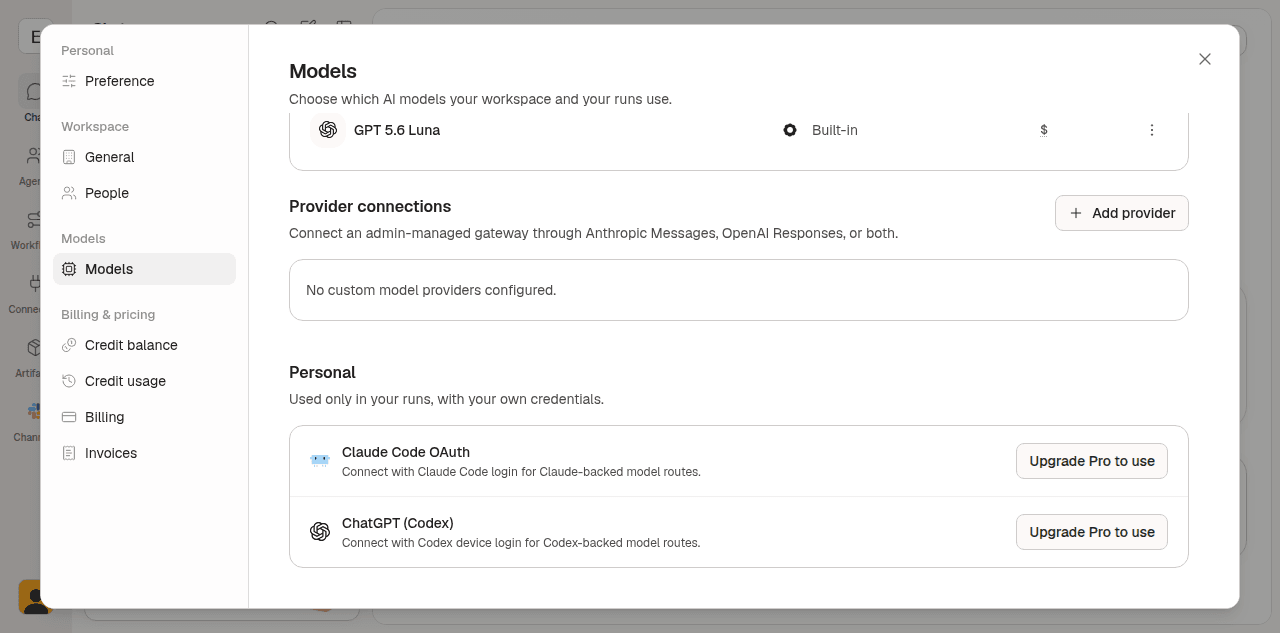
You can connect more than one account per provider and mark one active. Once connected, your account menu shows how much of each subscription window is left — the 5-hour window and the weekly one — so you can see a limit coming before a long run walks into it.
On a Free workspace both rows read Upgrade Pro to use, as above. That is the paid-plan gate, not a missing connection.
Three things to know before you start:
- Bringing your own provider is a paid-plan feature.
- A free ChatGPT plan cannot use Codex through Okou. Plus or Pro is required.
- Whichever route a model takes, tool calls, generation, and storage still bill against Okou credits. The subscription covers the thinking, not the doing.
The model picker beside the chat composer chooses a model; it does not override the route that policy has assigned to that model. The model also lives on the chat thread, not on the agent and not on the workflow — see Models.
2. Bring your skills across as workflows
What you call a skill, Okou calls a workflow: a named procedure with a description that says when it applies, an instruction that says how to do the work, and optional files bundled alongside. A SKILL.md you already wrote is, nearly line for line, a workflow instruction.
The fastest way to move one is to hand it over in chat:
"Here's a
SKILL.mdI use in Claude Code [paste]. Create a workflow from it on this agent. Keep the procedure, but replace the local file paths and shell steps with connectors, and tell me what it can't reach yet."
If you'd rather script the import than talk through it, your agent has the Okou CLI available inside its own run:
okou workflow create triage-bug-report \
  --description "triage a customer-facing bug report and file it to GitHub with severity" \
  --instruction-file ./instruction.md \
  --dir ./files/
SKILL.md is synthesized from the name, description, and instruction, so don't include one in --dir — it will be rejected.
Four differences worth fixing while you port
- A workflow belongs to exactly one agent, and it can only reach the connectors that agent is authorized for. A local skill inherits whatever your shell can reach; this one doesn't. If a ported workflow can't see Gmail, check the agent's authorization, not the instruction.
- The name is a lowercase slug —
triage-bug-report, 2 to 64 characters. Invoke it explicitly with/triage-bug-reportin the owning agent's chat, or just describe the work and let Okou match on the description. A precise description is what makes a workflow fire on its own. - New workflows are private by default. Making one public to the workspace is a deliberate step, not a side effect of saving. Two agents can hold the same procedure and produce different results, because each brings its own voice and its own permissions.
- Credentials don't travel. Anything that was an environment variable or a key in a local skill becomes a connector instead, so the secret stays on the platform and out of the model's reach. If no first-party connector fits, build a custom connector rather than pasting a key into an instruction.
One thing that does carry over unchanged: supplementary files. Templates, checklists, brand guidelines, and reference data attach to the workflow the same way they sat next to your SKILL.md.
3. Then use the parts a local CLI doesn't have
With your model route and your procedures in place, the rest of Okou is the part your laptop can't do:
- Connectors — authorized services your agent can read and write, with the credential held at the network boundary and every call visible in the run log. This replaces the pile of personal access tokens in your shell profile.
- Automations — a trigger attached to a workflow: a schedule, a new email, a merged pull request, a calendar event, a webhook. This is the part that turns a procedure into a teammate rather than a command you have to remember to run.
- Agents — a persistent identity with its own instruction, tone, and connector grants, so behaviour stays predictable across runs and across people.
- Integrations — the same agent reachable from Slack, Telegram, or the web, instead of from one terminal on one machine.
4. Share it, instead of keeping it in a dotfile
The real difference from a local setup is that other people can use what you built — including people who will never open a terminal.
- Make the agent Public and publish the workflow you want the team to run first.
- Strip credentials and one-off data out of the instruction and files before you do.
- Invite teammates from Settings → People → Add member, with Member as the default role. See Invite teammates.
- Each member connects their own accounts and, on a paid plan, their own Claude or Codex subscription. Nobody shares a login.
Steps 3 to 6 of For new users cover building an agent, publishing a workflow, and scheduling it in more detail. The mechanics are the same; only the starting point was different.
Where to go next
- Models — routing, your own subscription, and what each model costs you.
- Workflows — anatomy, ownership, visibility, and how Okou picks one.
- Automations — schedules, email, GitHub, calendar, and webhook triggers.
- Permissions — what an agent is allowed to touch, and how to narrow it.
- Custom connectors — for the internal API that has no first-party connector.

